
Cisco Webex Calling makes it easy to assign music and announcements to call queues and callers placed on hold. The challenge is keeping that audio fresh. Now, the Easy On Hold Webex Calling Hold Music App represents a leap forward.
A static file may work well when it is first uploaded, but over time, the same music, announcements, and “thank you for holding” messages become repetitive and outdated. Updating those files manually also creates an ongoing task for Webex administrators.
The Easy On Hold® Webex Calling App automates that process. It manages the scheduling, preparation, rotation, and delivery of audio used for Queue Music and Hold Music in Webex Calling, allowing organizations to maintain a more dynamic caller experience without repeatedly updating files inside Webex. Webex-Calling-App-Guide
What Does the Easy On Hold Webex Calling Hold Music App Do?
The Easy On Hold Webex Calling App connects the Easy On Hold content management platform with Webex Calling.
Instead of manually creating, formatting, uploading, replacing, and removing audio files, administrators can manage content through the Easy On Hold portal. The app then handles deployment to Webex Calling automatically.
The integration can:
- Automatically load and replace audio files in Webex Calling
- Schedule messages and music according to date, day, and time
- Remove expired content without requiring someone to remember to update the Webex configuration
- Reorder messages and music to reduce repetition
- Prepare audio in the appropriate format before deployment
- Assign different content to different call queues
- Deploy newly created or AI-generated announcements quickly
- Provide different audio sequencing for callers waiting in-queue and callers later placed on hold
The objective is to make queue and hold audio an actively managed communication channel rather than a collection of static files.
How the Webex Calling Integration Works
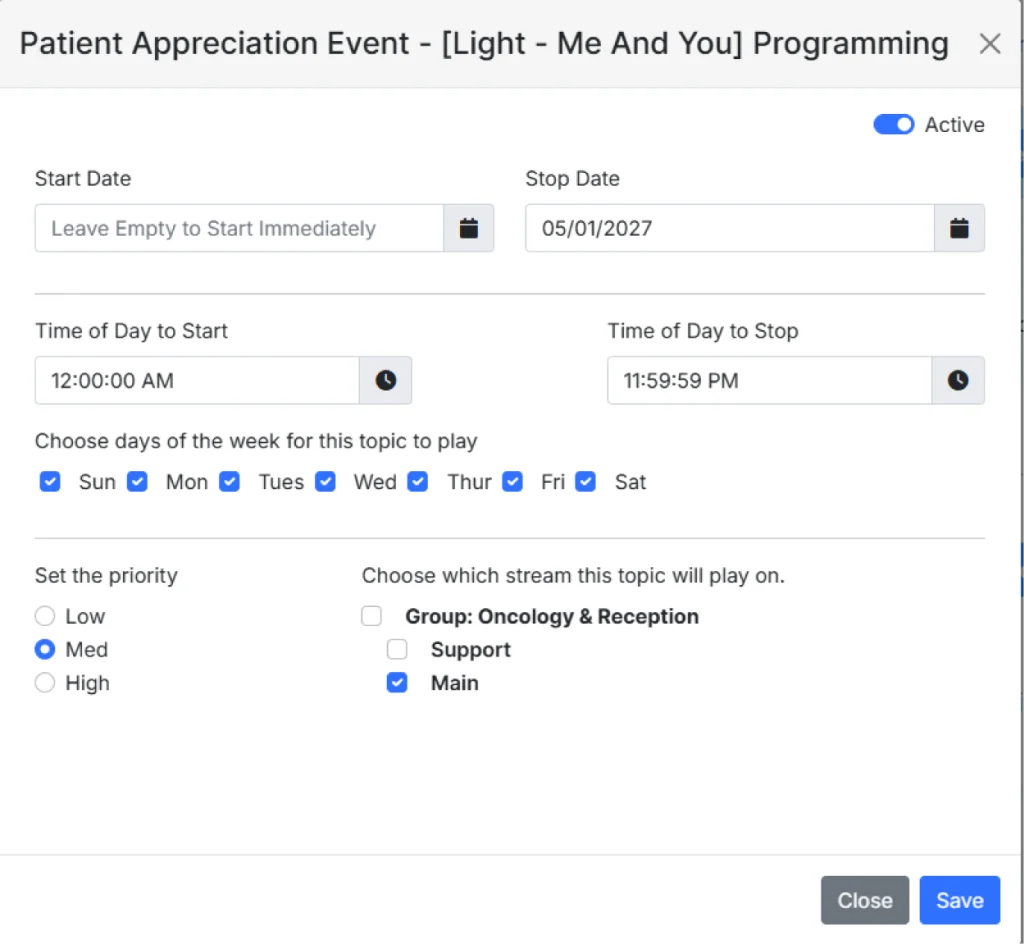
Audio management begins in the Easy On Hold Creative Content Center™. Individual messages or music selections are stored as separate audio files. A typical spoken message is relatively brief and focuses on one topic, often with its own music background. Each piece of content can then be programmed according to when and where it should be used.
Scheduling options include:
- Start date
- Stop date
- Time of day
- Days of the week
- Assigned audio stream or playlist
- Immediate On/Off control
The Webex Calling App examines the available content, determines which files should currently be active, and assembles the appropriate audio for each configured queue. Your Creative Content Center has built-in scheduling controls for assigning dates, times, days, and destinations to individual messages.
The Webex Calling Hold Music App Handles File Automation
Although Easy On Hold playlists may sometimes be referred to as “streams,” the Webex Calling integration does not deliver continuous streaming audio. The Webex app uses automated file management. When the integration is configured, the app retrieves the available Webex Calling queues and matches them with Easy On Hold playlists.
Behind the scenes, the application periodically:
- Reviews all audio stored in the Easy On Hold portal.
- Determines which files are currently scheduled to play.
- Identifies which active files are not already available in Webex.
- Prepares the audio in a format suitable for Webex Calling.
- Uploads the necessary files.
- Builds and deploys the correct playlist for each queue.
- Repeats the process periodically.
The synchronization interval may range from approximately 15 minutes to two hours, depending on configuration. This approach provides much of the scheduling flexibility associated with streaming audio while remaining compatible with Webex Calling’s file-based queue audio architecture.
Queue Variation Logic
One of the more useful features of the integration is what Easy On Hold calls Queue Variation Logic.
Consider a caller who first waits in a queue and hears several pieces of content:
Message A → Message B → Message C → Message D
The call is answered, and several minutes later, the agent places the caller on hold. Without variation logic, the caller might hear Message A again immediately.
Instead, the Webex Calling App can reverse the sequence used for agent hold:
Queue: A → B → C → D
Hold: D → C → B → A
The goal is to reduce the likelihood that callers hear the same audio twice during the same interaction. The app can also regularly shuffle content as playlists are rebuilt.
Connecting Easy On Hold to Webex Calling
The integration must be authorized by a user with appropriate administrative access. The Webex administrator also needs client administrator status in the Easy On Hold portal.
From the Easy On Hold portal:
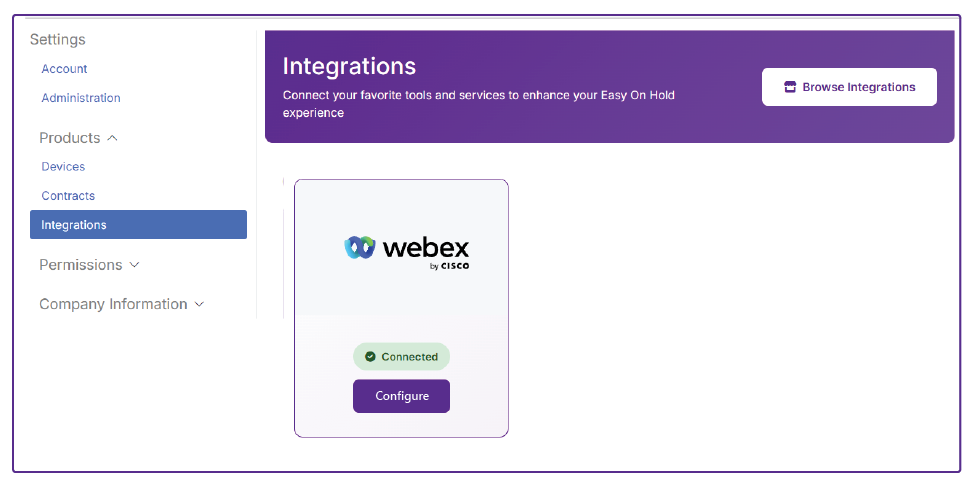
- Open the user menu and select Settings.
- Under Products, select Integrations.
- Choose Browse Integrations.
- Select Webex.
- Select Configure.
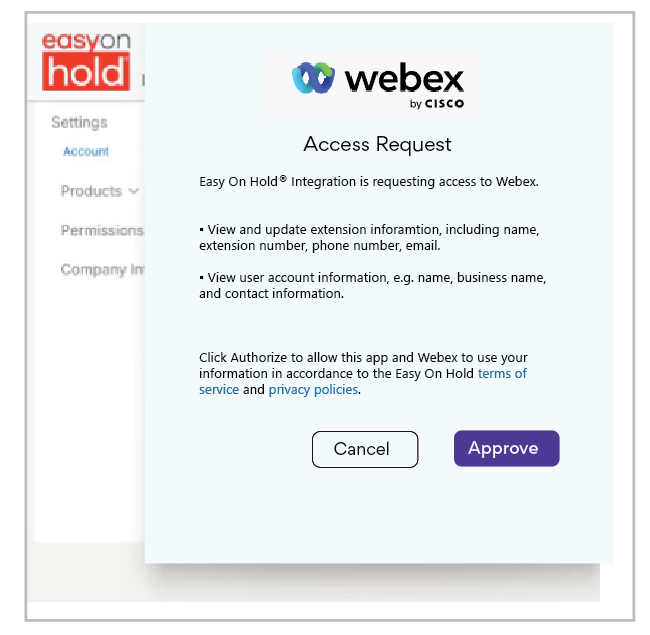
- Complete the Webex authorization request.
- Refresh the browser after authorization.
- Open the Webex integration and select Manage.
The authorization allows the application to view and update the Webex information necessary to manage the integration. The screenshots below show the authorization process and the interface for associating Easy On Hold playlists with Webex Calling queues.
Mapping Playlists to Webex Queues
Once connected, the application retrieves the Webex Calling queues available to the organization. Administrators can then associate those queues with Easy On Hold playlists.
For example:
| Webex Queue | Easy On Hold Playlist |
|---|---|
| Sales | Sales & Promotions |
| Customer Service | Customer Care |
| Spanish Service | Spanish Messaging |
| Main Office | Corporate Playlist |
A single playlist can also be assigned to multiple queues.
The configuration is flexible; organizations can use unique audio for individual departments, locations, languages, or business units, or use a single common playlist across the organization.
Recommended Webex Administration Practice
Any Webex administrator account can be used when the integration is initially authorized. However, Easy On Hold recommends using a dedicated service user account rather than tying the integration to an individual employee. A service account provides better continuity if the administrator who originally created the connection changes roles or leaves the organization.
The associated Easy On Hold portal account must also have client administrator privileges.
Automatic Scheduling
One of the main advantages of the integration is the ability to schedule content in advance. Marketing or communications teams can prepare messages in advance and assign rules, such as:
- Play only during a certain month
- Begin on a specific date
- Stop automatically after a promotion expires
- Play only Monday through Friday
- Play only during business hours
- Play only in selected queues
- Activate immediately when needed
This makes it possible to build an annual communications calendar without requiring administrators to manually replace Webex files every time a campaign changes.
Daypart Greetings
Messages can also vary by day of the week.
For example:
A Great Day
Thanks for your call today. Hope you’re having a great Tuesday.
Weekly Announcements
Hope you’re having a great Friday. Remember, our Saturday hours are 9 AM to Noon. See you soon.
The app can automatically select the appropriate content based on the schedule programmed in the Easy On Hold portal. The Webex Calling Hold Music App Guide (download here) provides additional examples of dayparting, including greetings tailored to specific weekdays or high-volume periods. Webex-Calling-App-Guide
Seasonal and Promotional Messaging
Seasonal messaging is another application of automated scheduling.
Organizations can prepare audio for:
- Holiday hours
- Seasonal promotions
- Special events
- Enrollment periods
- Product launches
- Limited-time offers
Start and expiration dates can be programmed when the message is created.
Once the expiration date passes, the content is no longer included in the active Webex playlist. This helps prevent situations where holiday messages continue to play after the holiday has passed.
Rapid Updates With AI-Generated Audio
The integration can also work with the Easy On Hold AI Studio. A user can create a new spoken announcement, optionally add music, and make the content available for automated deployment.
This can be particularly useful for unexpected situations such as:
- Service interruptions
- Weather closures
- Temporary office closures
- Policy changes
- Emergency instructions
- Last-minute promotional updates
This is a convenient way to create and deploy time-sensitive announcements without requiring recording equipment or traditional voice production.
Weather-Aware Messaging
Easy On Hold also supports weather-driven caller messaging through an AccuWeather® integration. Current conditions or forecasts can be incorporated into caller audio and refreshed automatically.
Potential uses include organizations where the weather directly influences customer activity, including:
- Golf courses
- Municipalities
- Schools and universities
- Hotels and resorts
- Travel-related organizations
Weather reports are updated hourly, directly from AccuWeather.
Music-Only Webex Queues
The integration does not require spoken messaging. Organizations that prefer music-only queues can use the same automation to provide greater musical variety. Instead of assigning one short music file that repeats continuously, the application can rotate licensed music selections and rebuild playlists periodically.
This makes it less likely that repeat callers hear exactly the same music every time they contact the organization.
Who Manages What?
A useful way to think about the integration is that Webex Calling continues to manage the communications platform, while Easy On Hold manages the caller-audio experience.
Webex Calling
Webex remains responsible for:
- Calling
- Queues
- Routing
- Users
- Analytics
- Platform administration
Easy On Hold
Easy On Hold manages:
- Music
- Spoken messaging
- Scheduling
- Audio formatting
- Playlist rotation
- File deployment
- Expiration of outdated content
The application does not replace Webex Calling. It adds automation around the audio that Webex uses for queue and hold experiences. Webex-Calling-App-Guide
Benefits for IT
For Webex administrators, the most significant advantage is reduced manual audio maintenance.
IT no longer has to routinely:
- Convert audio files
- Upload replacements
- Remove expired files
- Reorder playlists
- Coordinate routine message changes
- Respond to every marketing content update
The integration allows IT to maintain control of Webex and its permissions while routine content management moves outside the Webex administration workflow.
Benefits for Marketing and Communications
Marketing teams gain more direct control over what callers hear. They can schedule campaigns, update messages, maintain brand consistency, and prepare future content without having to ask IT to manually deploy each revision.
This turns the telephone queue from a static technical feature into another managed customer communication channel.
A More Dynamic Webex Caller Experience
Webex Calling provides the infrastructure for answering, routing, queuing, and managing calls.
The Easy On Hold Webex Calling App adds automation to the audio callers hear while they wait.
Through automatic file deployment, scheduling, playlist variation, AI-generated announcements, dayparting, and queue-specific content, organizations can keep Webex queue and hold audio up to date without turning audio management into another recurring IT task.
For organizations already using Webex Calling, the integration provides a practical way to move beyond a single, static hold-music file and create a caller experience that evolves with the business.
Easy On Hold offers demonstrations of the Webex Calling App. We recommend including both Webex/IT administrators and marketing or communications staff in the session so that each team can see how the technical integration and content management workflow fit together.