
The Easy On Hold® Genesys Queue & Hold Music App automates the preparation and delivery of music and messages for callers waiting in a queue or placed on hold by an agent.
Instead of repeatedly creating, formatting, and manually uploading audio files, authorized users manage their content and scheduling preferences through the Easy On Hold Content Control Center. The app then automatically prepares and updates the appropriate Genesys Cloud audio.
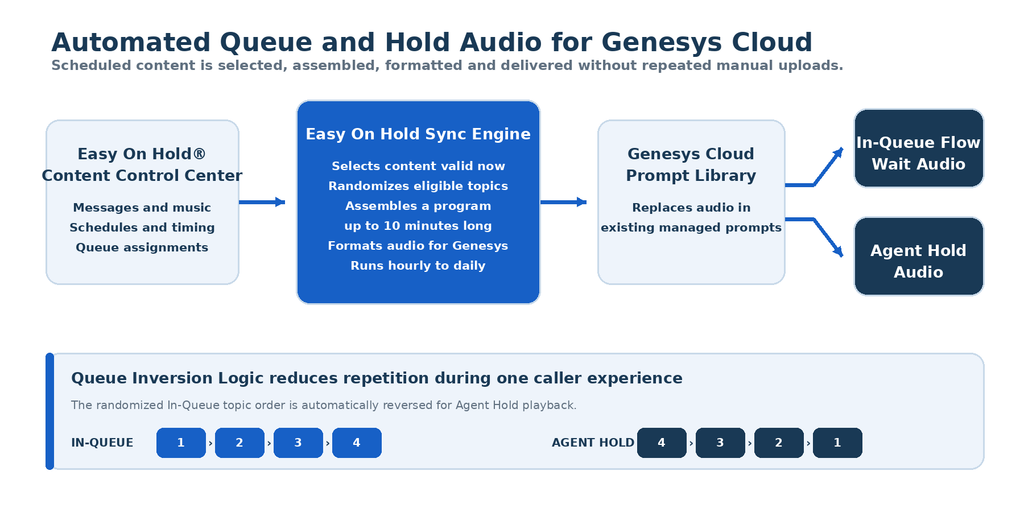
How The EOH Genesys Hold Music App Automates Content Management
The app periodically evaluates the customer’s Easy On Hold content based on preferences set in the Content Control Center and determines which messages, music, and topics are eligible when each update is created. They can include:
- Start and stop dates
- Days of the week
- Time-of-day schedules
- Queue destination assignments
- Immediate on/off control
Seasonal, promotional and operational content can enter or leave service automatically without requiring someone to manually update audio in Genesys Cloud.
How Your Audio Updates Are Created
During each update, the app:
- Identifies the messages and music that are active according to the customer’s schedule.
- Randomly selects and arranges the eligible content.
- Assembles the content into a single audio program up to 10 minutes long.
- Prepares the program in the audio format required by Genesys Cloud.
- Uploads it to the Genesys Architect prompt library.
- Replaces the existing prompt audio referenced by the applicable In-Queue Flow or Agent Hold audio setting.
The app updates the audio behind the existing prompt. It does not continually modify the customer’s Architect flows.
Depending on the customer’s preferences, this process can run from once per day to once per hour.
Queue Inversion Logic
When both In-Queue and Agent Hold audio are managed, Queue Inversion Logic helps prevent callers from hearing the same content repeated during a single caller experience.
The topics selected and randomly arranged for In-Queue playback are automatically placed in reverse order for Agent Hold playback. If a caller waits in a queue and is later placed on hold by an agent, the caller hears a different portion of the program instead of immediately hearing the same topics again.
In-Queue Audio
For queue-wait audio, the appropriate Hold Music action in the Genesys Architect flow references an Easy On Hold-managed prompt.
The flow is configured during the initial setup. After that, routine content changes are delivered by replacing the audio associated with the prompt rather than repeatedly editing and republishing the flow.
Agent Hold Audio
Agent Hold audio can also reference an Easy On Hold-managed prompt. When Agent Hold and In-Queue audio are both enabled, the app can prepare coordinated versions using Queue Inversion Logic to reduce repeated content.
Genesys Hold Music App One-Time Customer Setup
A Genesys Cloud administrator authorizes the connection to the Easy On Hold Genesys Cloud Queue & Hold Music App.
For queue-wait audio, the relevant Hold Music action is pointed to the Easy On Hold-managed prompt. A service account is recommended where the customer’s security policy permits one.
The initial setup also includes the following:
- The administrator must have the appropriate Architect permissions and queue-edit rights.
- Easy On Hold and the customer reviews the applicable flows during implementation.
- The customer establishes content, scheduling and destination preferences in the Easy On Hold Content Control Center.
After setup, routine audio changes are handled through the Easy On Hold app rather than repeated manual flow edits.
What the Genesys Hold Music App WON’T Change
The app updates the audio associated with designated Genesys Cloud prompts. It does not take over or routinely change:
- Call routing
- Queue configuration
- Service levels
- Architect flow logic
- Agent interactions
- Other contact-center settings
Genesys Cloud continues to control call handling and audio playback. Easy On Hold manages the content, scheduling, sequence, audio preparation, and prompt updates.
Current Availability
The Easy On Hold Genesys Cloud Queue & Hold Music App is currently available.