Analog audio connections can sometimes cause low volume or hum. These issues can be difficult to resolve. We offer a transformer that may help improve your on-hold audio quality.
What The Transformer Does
Inside this simple device, coils of wire transfer the audio signal magnetically, helping separate the audio player electrically from the telephone system. This can reduce hum caused by ground loops. The transformer can also adapt the signal to better suit the music-on-hold input of a legacy phone system, potentially improving usable volume.
How To Connect The Transformer
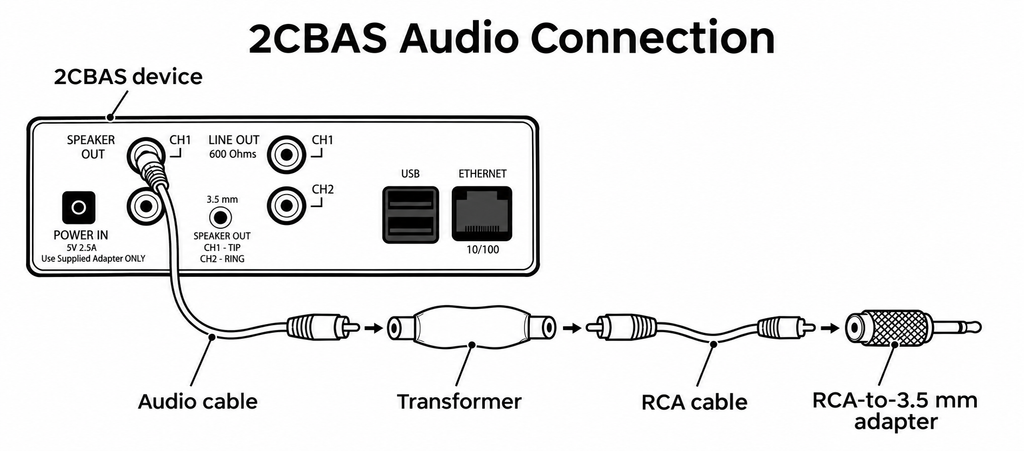
Connect the audio cable to the CH1 Speaker Out jack on the 2CBAS device, then plug the other end into the transformer. Connect the RCA cable to the transformer’s opposite end. If your phone system requires a 3.5 mm jack, attach the RCA-to-3.5 mm adapter to the free end of the RCA cable, then insert the adapter into your telephone system’s music-on-hold input. Make sure all connections are fully seated.
Test On Hold Audio Quality
Please a phone call and get placed on hold to test on hold audio quality. Adjust the volume of the audio device as needed.